You don't need to pay for an expensive website builder just to give neighbors a clean, memorable web address for your farmstand, micro-bakery, or apiary. Inside the roadside.market Business Manager, you can activate a free Roadside Subdomain in one click—or connect your own Custom Domain to host your map and storefront under your farm's brand.
1. Enabling Your Free Roadside Subdomain
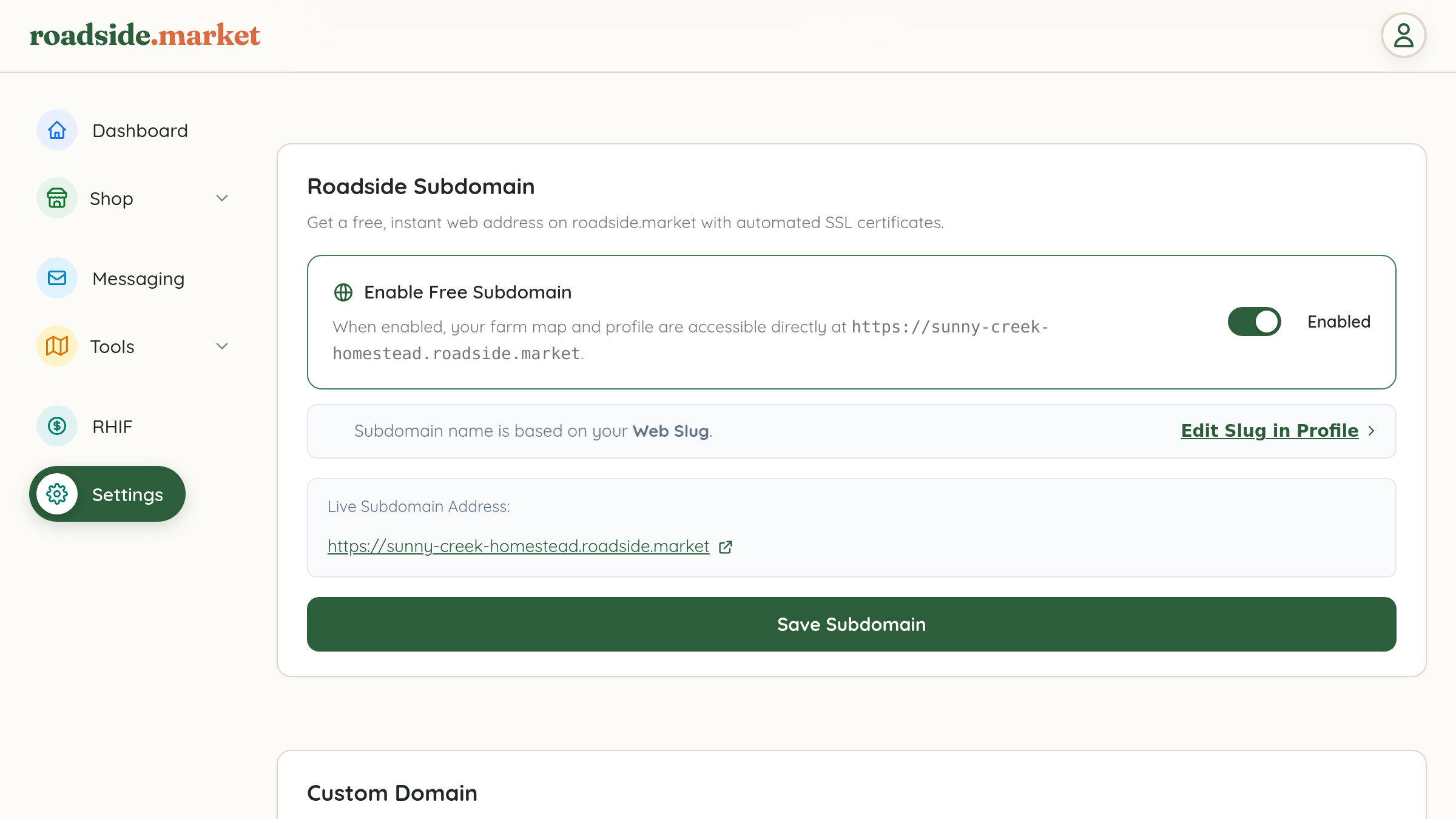
Every claimed business on roadside.market includes a free, instant subdomain with automatic HTTPS/SSL security:
- Open your Business Manager, click Settings in the left sidebar, and switch to the Site subtab at the top.
- Scroll to the Roadside Subdomain card.
- Flip the Enable Free Subdomain toggle switch on (`Enabled`).
- Click the green Save Subdomain button. Your farm map and profile are immediately live at
https://<your-slug>.roadside.market!
2. Connecting Your Own Custom Domain

If you already own a domain name (through Cloudflare, Namecheap, GoDaddy, or Google/Squarespace Domains) and have the Custom Domain entitlement unlocked, you can point a subdomain like map.myfarm.com or your root domain directly to roadside.market:
- Still inside Settings → Site, scroll down to the Custom Domain card.
- In the Domain Name input field, type the domain or subdomain you want to connect (for example,
map.sunnycreekhomestead.com). - Click the green Save Custom Domain button to bind the hostname to your business profile and provision SSL.
3. What Customers See on Your Subdomain or Custom Domain
- Dedicated Farm Map View: Visitors land directly on a map scoped to your business's farmstands and market booths, styled with your Business-Wide Theme and custom pins.
- Integrated Online Storefront: Your Online Farm Storefront, Weekly Bake Drops, and Buyer Messaging all work seamlessly right under your custom web address!