Some of the best weekends start with a simple plan: grab an iced coffee, roll the windows down, and take the back roads to visit four or five local farmstands in one afternoon. Along the way, you pick up warm sourdough at the first stop, pasture-raised duck eggs at the second, wildflower honey at the third, and cut zinnias at the fourth.
To celebrate the adventure of back-road exploring, roadside.market includes Trail Mode and a personal Digital Passport & Stamp Book for every user.
1. Turning On Trail Mode
Curated Trails are public, themed routes of farmstands and markets—like an Autumn Cider & Pumpkin Loop, a Saturday Sourdough Trail, or a regional County Farmstead Tour.
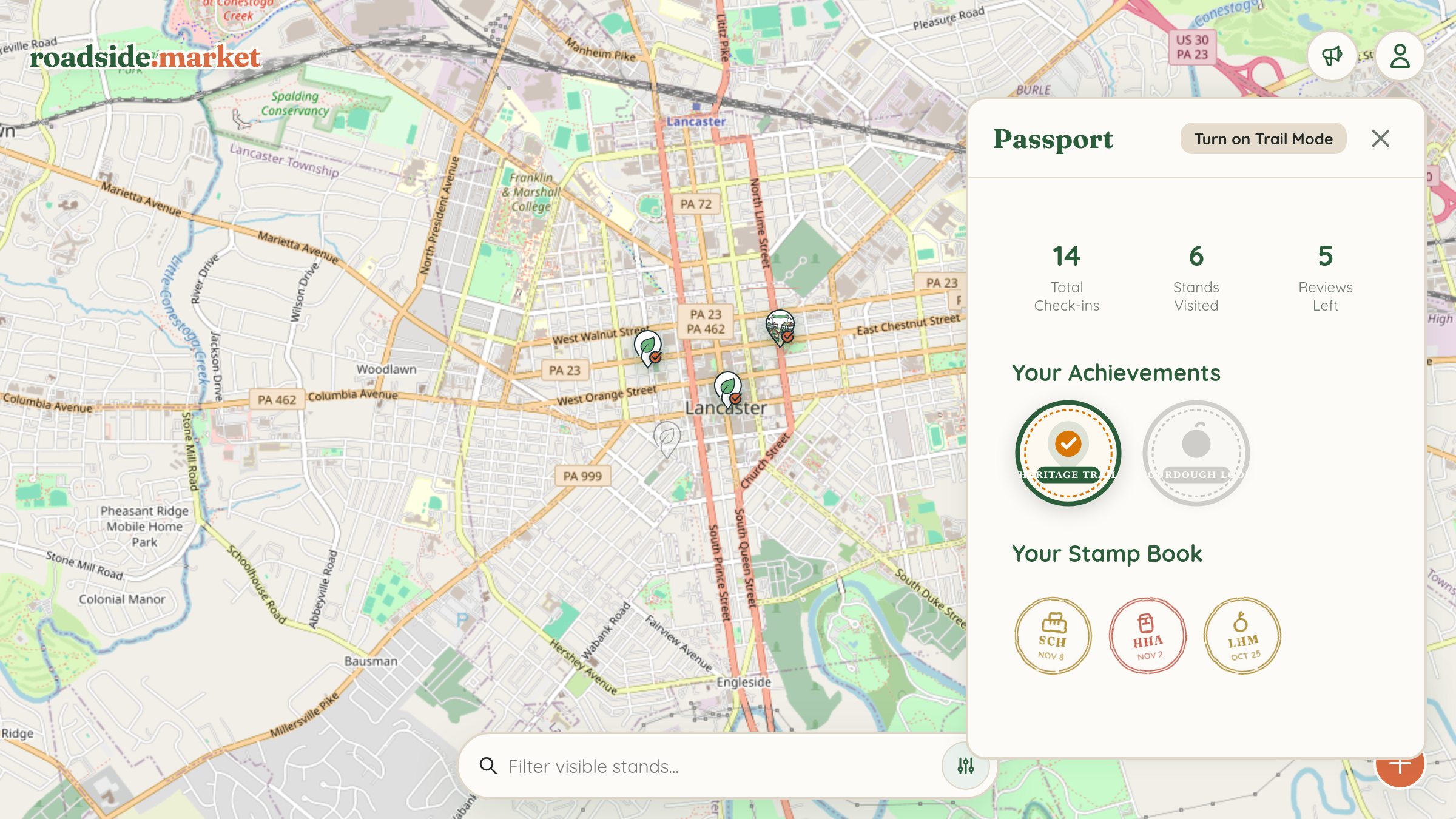
- From Your Passport: Open the User Menu, tap My Passport, and click "Turn on Trail Mode" in the top header.
- From Any Stand Card: If a stand belongs to one or more trails, you'll see a "Part of these Trails" section right inside its details drawer. Tap the map icon next to any trail to launch it immediately!
- Search or Filter "Near Me": Inside the Trail Switcher drawer, type a keyword or tap Near Me to find trails within 50 miles of where you are.
When Trail Mode is active, the map highlights all stops on that trail and connects them with an interactive route line, alongside a top banner that lets you switch or exit the trail anytime.
2. Stamping Your Digital Passport

Every time you visit a farmstand on the map—whether it's part of an official trail or a neighborhood stand down the street—open its detail card and tap the Check-in button:
- Custom Vintage Ink Stamps: Each stand generates a unique distress-ink stamp in green, terracotta, indigo, or gold ink, complete with the stand's primary category illustration, three-letter initials, and the date of your first visit.
- Repeat-Visit Gold Pips: Are you a loyal regular? Every subsequent check-in at the same stand adds a gold perimeter dot along the top edge of your stamp so you can show off your favorite weekly stops.
- Review Star Emblem: Leave a review for a stand you've visited, and your stamp is crowned with a ★ Reviewed badge.
- Interactive Stamp Book: Tapping any stamp in your Passport flies the map straight back to that farmstand!
3. Unlocking Trail Achievement Badges
At the top of your Passport, you'll see your lifetime stats (Total Check-ins, Stands Visited, and Reviews Left) followed by Your Achievements. As soon as you check in at the first stand on a trail, that trail appears as In Progress (e.g., 2/5 stands visited). Check in at every stop on the trail, and you'll unlock the full-color Trail Achievement Badge in your trophy case!
Want to create your own route? Learn how to build a private driving itinerary with the Trip Planner, or publish an official public trail for your town with the Trail Builder.