If your farm, orchard, or cottage bakery already has a website on Squarespace, WordPress, Wix, Webflow, or Shopify, keeping your "Where to Find Us" page updated can feel like double the work—especially if you manage a self-serve roadside stand, a weekend farmers market booth, and changing seasonal hours.
Instead of editing a static text page every time you sell out early or update your hours, you can embed your live roadside.market Business Map directly onto your existing website in less than a minute.
1. Generating Your HTML Map Embed Code
Every claimed business on roadside.market has access to the built-in HTML map embed generator inside the Business Manager:
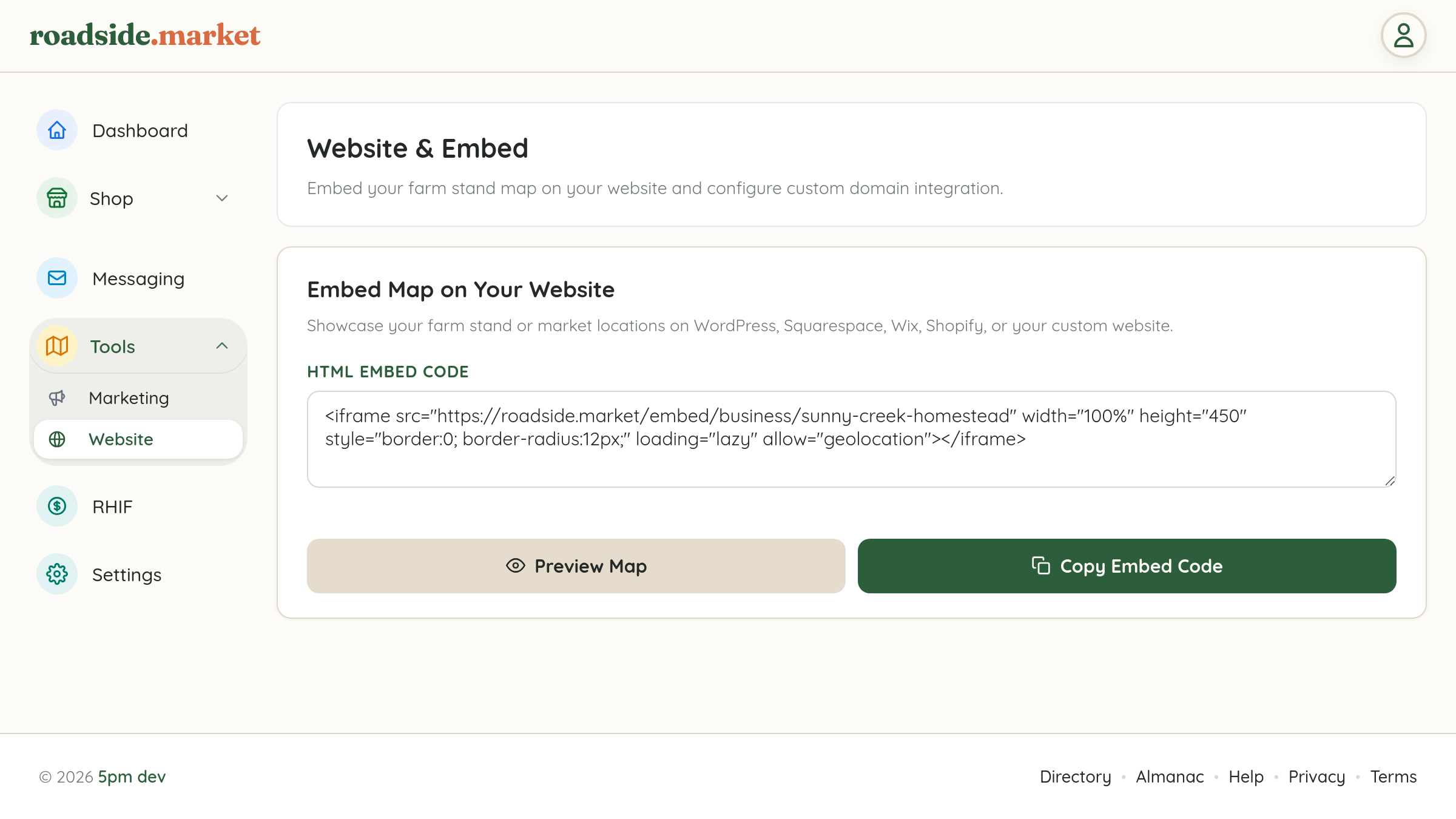
- Open your Business Manager and expand Tools → Website in the left navigation sidebar.
- Locate the Embed Map on Your Website card.
- Inside the HTML Embed Code box, you'll see a ready-to-use
<iframe>snippet pre-configured with your unique Business Web Slug. - Click the green Copy Embed Code button to copy the snippet directly to your clipboard.
2. Testing with the Live Map Preview Modal

Want to see exactly how your embedded map will look to website visitors before publishing it?
- Click the Preview Map button next to Copy Embed Code to open the Embed Map on Your Website modal.
- Click Toggle Live Preview inside the modal to render the interactive map frame right inside your dashboard.
- You can test clicking your farmstand pin, viewing your custom pin icons and Business-Wide Theme, and checking your open/closed status badge, then click Copy Code when you're ready.
3. Pasting the Embed into Your Website Builder
Because the snippet uses a standard responsive HTML <iframe> (`width="100%" height="450"`), it works out of the box on every major website platform:
- Squarespace: Edit your page, click Add Block → Code (or Embed → Embed Data), and paste the snippet.
- WordPress: Add a Custom HTML block in the Gutenberg editor and paste the snippet.
- Wix & Shopify: Add an Embed HTML element or switch your page editor to HTML view (`<>`) and paste the code.
- Live Sync: Whenever you post a Live Restock Update or tap Close for Today from your phone, visitors on your website see the update in real time without you ever touching your website builder!